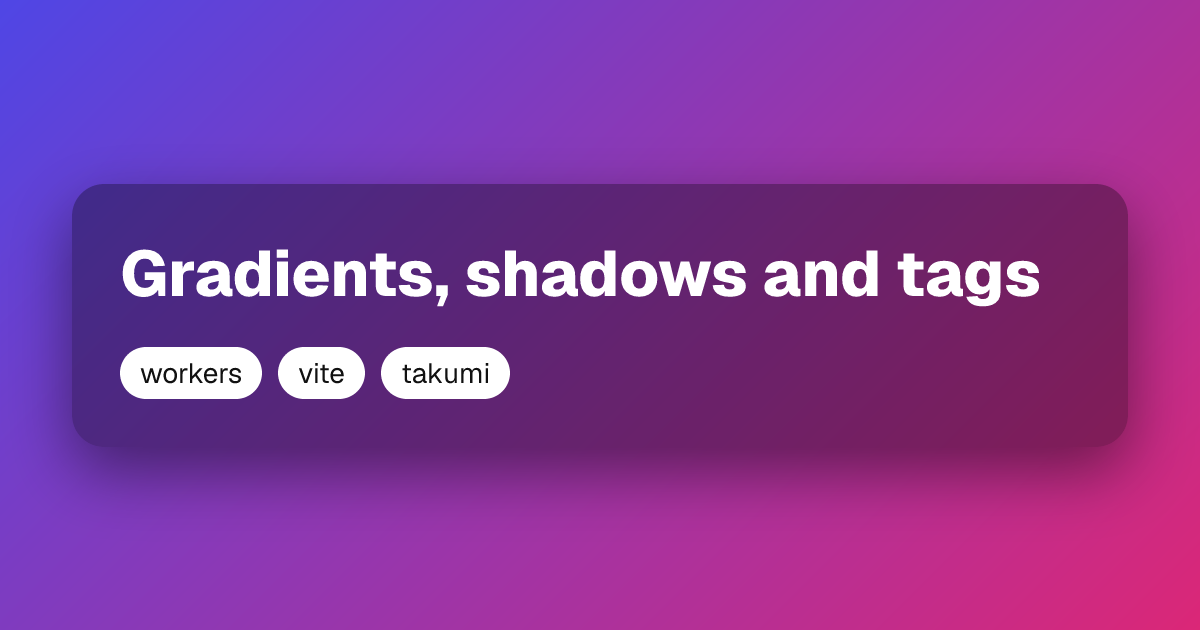
void/og demo

Each image is rendered on request by the code beside it.

latin image stats

latin
import { ImageResponse } from 'void/og';

export default () =>
  new ImageResponse(
    <div
      style={{
        display: 'flex',
        flexDirection: 'column',
        justifyContent: 'center',
        width: '100%',
        height: '100%',
        padding: 72,
        background: '#0b0b0f',
        color: '#fff',
      }}
    >
      <div style={{ fontSize: 72, fontWeight: 700 }}>Shipping Open Graph images</div>
      <div style={{ fontSize: 36, opacity: 0.7, marginTop: 24 }}>by the Void team</div>
    </div>,
  );

rich image stats

rich
import { ImageResponse } from 'void/og';

export default () =>
  new ImageResponse(
    <div
      style={{
        display: 'flex',
        flexDirection: 'column',
        justifyContent: 'center',
        width: '100%',
        height: '100%',
        padding: 72,
        background: 'linear-gradient(135deg, #4f46e5 0%, #db2777 100%)',
        color: '#fff',
      }}
    >
      <div
        style={{
          display: 'flex',
          flexDirection: 'column',
          padding: 48,
          borderRadius: 32,
          background: 'rgba(0,0,0,0.35)',
          boxShadow: '0 24px 64px rgba(0,0,0,0.45)',
        }}
      >
        <div style={{ fontSize: 64, fontWeight: 800 }}>Gradients, shadows and tags</div>
        <div style={{ display: 'flex', gap: 16, marginTop: 32 }}>
          {['workers', 'vite', 'takumi'].map((tag) => (
            <div
              key={tag}
              style={{
                fontSize: 28,
                padding: '8px 20px',
                borderRadius: 999,
                background: '#fff',
                color: '#111',
              }}
            >
              {tag}
            </div>
          ))}
        </div>
      </div>
    </div>,
  );

ja image stats

ja
import { ImageResponse } from 'void/og';

export default () =>
  new ImageResponse(
    <div
      style={{
        display: 'flex',
        flexDirection: 'column',
        justifyContent: 'center',
        width: '100%',
        height: '100%',
        padding: 72,
        background: '#0b0b0f',
        color: '#fff',
      }}
    >
      <div style={{ fontSize: 60, fontWeight: 700, lineHeight: 1.3 }}>
        東京の老舗喫茶店が受け継ぐ珈琲焙煎の技術と、新しい世代の職人たちが挑む味わいの変化について
      </div>
      <div style={{ fontSize: 32, opacity: 0.7, marginTop: 24 }}>2026年11月12日・山田太郎</div>
    </div>,
  );

zh-cn image stats

zh-cn
import { ImageResponse } from 'void/og';

export default () =>
  new ImageResponse(
    <div
      lang="zh-CN"
      style={{
        display: 'flex',
        flexDirection: 'column',
        justifyContent: 'center',
        width: '100%',
        height: '100%',
        padding: 72,
        background: '#0b0b0f',
        color: '#fff',
      }}
    >
      <div style={{ fontSize: 64, fontWeight: 700, lineHeight: 1.3 }}>
        用 Void 在边缘生成社交分享图片:从零开始的完整指南
      </div>
      <div style={{ fontSize: 32, opacity: 0.7, marginTop: 24 }}>2026年11月12日 · 王小明</div>
    </div>,
  );

zh-tw image stats

zh-tw
import { ImageResponse } from 'void/og';

export default () =>
  new ImageResponse(
    <div
      lang="zh-TW"
      style={{
        display: 'flex',
        flexDirection: 'column',
        justifyContent: 'center',
        width: '100%',
        height: '100%',
        padding: 72,
        background: '#0b0b0f',
        color: '#fff',
      }}
    >
      <div style={{ fontSize: 64, fontWeight: 700 }}>台北101觀景台(タワー)夜景攝影指南</div>
    </div>,
  );

ko image stats

ko
import { ImageResponse } from 'void/og';

export default () =>
  new ImageResponse(
    <div
      style={{
        display: 'flex',
        flexDirection: 'column',
        justifyContent: 'center',
        width: '100%',
        height: '100%',
        padding: 72,
        background: '#0b0b0f',
        color: '#fff',
      }}
    >
      <div style={{ fontSize: 64, fontWeight: 700, lineHeight: 1.3 }}>
        서울의 오래된 골목에서 만난 커피 장인들의 이야기
      </div>
      <div style={{ fontSize: 32, opacity: 0.7, marginTop: 24 }}>2026년 11월 12일 · 김민준</div>
    </div>,
  );

han-ja image stats

han-ja
import { ImageResponse } from 'void/og';

export default () =>
  new ImageResponse(
    <div
      style={{
        display: 'flex',
        flexDirection: 'column',
        justifyContent: 'center',
        width: '100%',
        height: '100%',
        padding: 72,
        background: '#0b0b0f',
        color: '#fff',
      }}
    >
      <div style={{ fontSize: 40, opacity: 0.7 }}>lang: ja</div>
      <div style={{ fontSize: 120, fontWeight: 700, marginTop: 24 }}>直骨角今海次器</div>
    </div>,
    { lang: 'ja' },
  );

han-zh-cn image stats

han-zh-cn
import { ImageResponse } from 'void/og';

export default () =>
  new ImageResponse(
    <div
      style={{
        display: 'flex',
        flexDirection: 'column',
        justifyContent: 'center',
        width: '100%',
        height: '100%',
        padding: 72,
        background: '#0b0b0f',
        color: '#fff',
      }}
    >
      <div style={{ fontSize: 40, opacity: 0.7 }}>lang: zh-CN</div>
      <div style={{ fontSize: 120, fontWeight: 700, marginTop: 24 }}>直骨角今海次器</div>
    </div>,
    { lang: 'zh-CN' },
  );

han-zh-tw image stats

han-zh-tw
import { ImageResponse } from 'void/og';

export default () =>
  new ImageResponse(
    <div
      style={{
        display: 'flex',
        flexDirection: 'column',
        justifyContent: 'center',
        width: '100%',
        height: '100%',
        padding: 72,
        background: '#0b0b0f',
        color: '#fff',
      }}
    >
      <div style={{ fontSize: 40, opacity: 0.7 }}>lang: zh-TW</div>
      <div style={{ fontSize: 120, fontWeight: 700, marginTop: 24 }}>直骨角今海次器</div>
    </div>,
    { lang: 'zh-TW' },
  );

han-ko image stats

han-ko
import { ImageResponse } from 'void/og';

export default () =>
  new ImageResponse(
    <div
      style={{
        display: 'flex',
        flexDirection: 'column',
        justifyContent: 'center',
        width: '100%',
        height: '100%',
        padding: 72,
        background: '#0b0b0f',
        color: '#fff',
      }}
    >
      <div style={{ fontSize: 40, opacity: 0.7 }}>lang: ko</div>
      <div style={{ fontSize: 120, fontWeight: 700, marginTop: 24 }}>直骨角今海次器</div>
    </div>,
    { lang: 'ko' },
  );

cjk-weights image stats

cjk-weights
import { ImageResponse } from 'void/og';

export default () =>
  new ImageResponse(
    <div
      style={{
        display: 'flex',
        flexDirection: 'column',
        justifyContent: 'center',
        gap: 8,
        width: '100%',
        height: '100%',
        padding: 72,
        background: '#0b0b0f',
        color: '#fff',
      }}
    >
      {[200, 400, 700, 900].map((weight) => (
        <div key={weight} style={{ fontSize: 56, fontWeight: weight }}>
          {weight} 日本語・中文・한국어
        </div>
      ))}
    </div>,
  );

weight-550 image stats

weight-550
import { ImageResponse } from 'void/og';

export default () =>
  new ImageResponse(
    <div
      style={{
        display: 'flex',
        flexDirection: 'column',
        justifyContent: 'center',
        width: '100%',
        height: '100%',
        padding: 72,
        background: '#0b0b0f',
        color: '#fff',
      }}
    >
      <div style={{ fontSize: 72, fontWeight: 550 }}>日本語 at weight 550</div>
    </div>,
  );

mixed image stats

mixed
import { ImageResponse } from 'void/og';

export default () =>
  new ImageResponse(
    <div
      style={{
        display: 'flex',
        flexDirection: 'column',
        justifyContent: 'center',
        width: '100%',
        height: '100%',
        padding: 72,
        background: '#0b0b0f',
        color: '#fff',
      }}
    >
      <div style={{ fontSize: 52 }}>Łódź · Привет · مرحبا · สวัสดี · नमस्ते</div>
      <div style={{ fontSize: 52, marginTop: 24 }}>→ ★ ∑ ∞ 🚀 🎉</div>
    </div>,
  );